Introducing the Subly Android App: AI Video Translation & Subtitles on the Go
We are excited to share a major milestone in our mission to break language barriers worldwide: the official Subly Android app is now live on the Google Play Store!
Whether you are a content creator wanting to localize your videos for global audiences, an international student watching lectures in another language, or simply someone trying to enjoy viral clips from abroad, Subly on Android puts the full power of AI video translation right in your pocket.
Why Mobile Video Translation Matters
Over 80% of digital video consumption happens on mobile phones. Until now, translating a video required either a desktop computer with complex editing software or juggling multiple tools to transcribe, translate, re-sync subtitles, and re-encode the file.
With the Subly Android app, the entire end-to-end pipeline is automated. Simply paste a link from your favorite social platform or choose a video from your gallery, pick your target language, and let our cloud AI engine do the heavy lifting in seconds.
Visual Tour: What You Can Do with Subly on Android
1. Instant Link Translation & File Upload
The home screen is built for speed and clarity. You can paste video URLs directly from clipboard or tap Upload file to pick videos and audio recordings straight from your phone's storage.
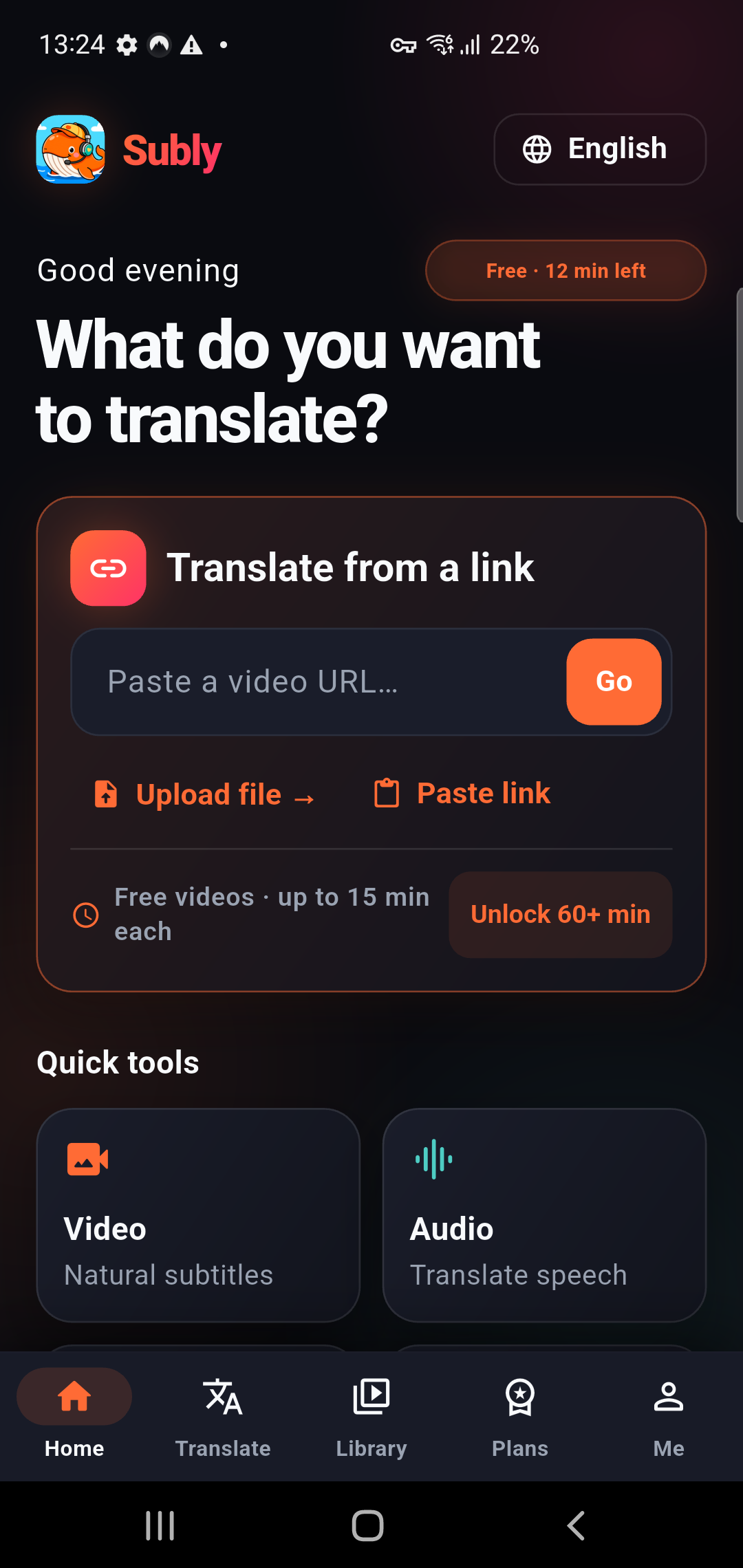
Subly Home: One-tap link intake, quick tools, and instant file uploads.
Subly supports all major video platforms, including: - YouTube (Shorts, tutorials, full videos) - TikTok & Instagram Reels - Facebook, X (Twitter), and Vimeo - Local files in MP4, MOV, MKV, and audio formats like MP3
2. Intelligent Language Selection & Translation Flow
Selecting your target language is seamless. Subly features auto-detection for the original audio language, so you never have to guess the source speech.
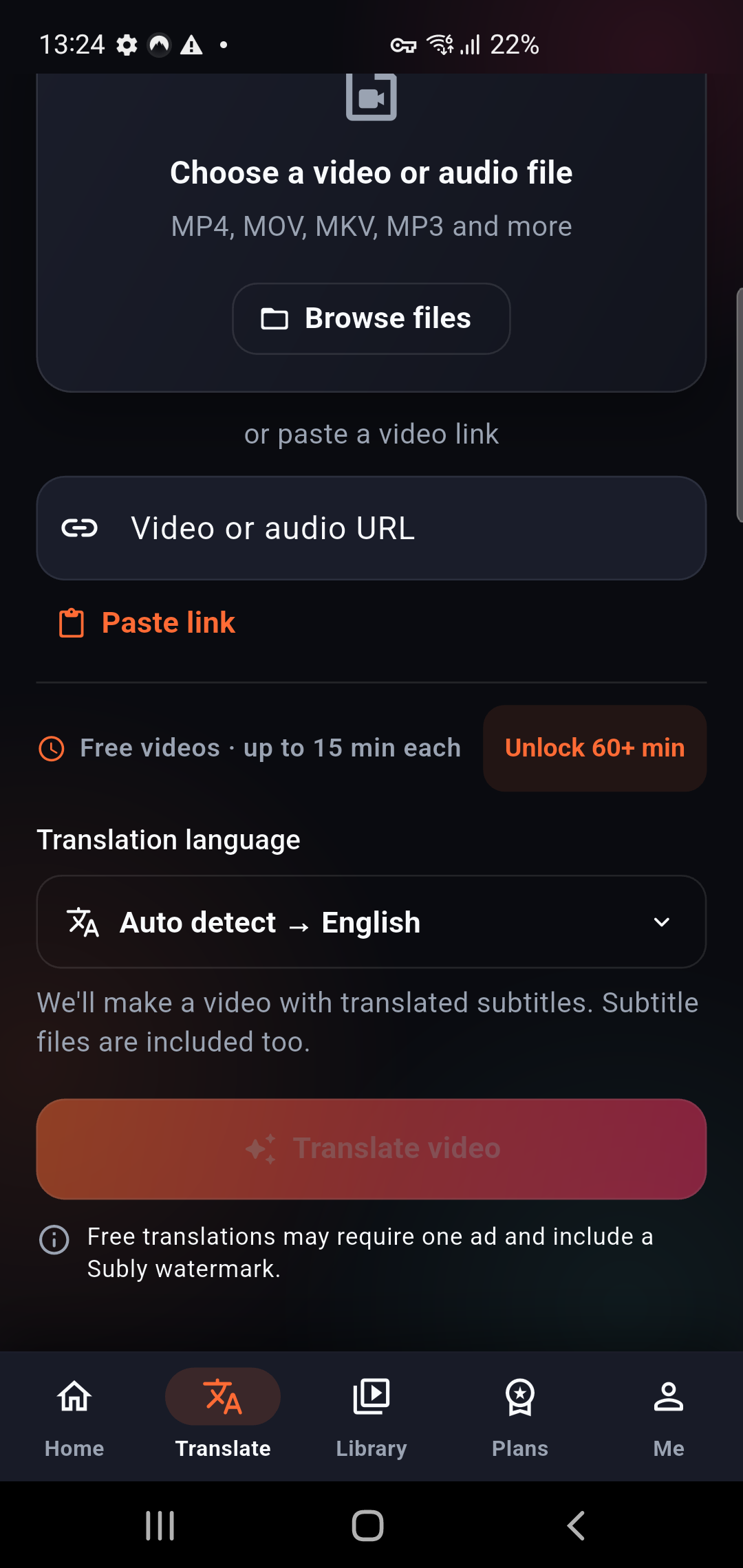
Translation options: Auto-detect source language and select your target output.
With support for over 40 languages — including English, Spanish, Vietnamese, Arabic, Russian, Persian, German, French, Chinese, Japanese, and Korean — Subly bridges communication across continents with contextual, culturally aware translations.
3. Background Processing & Real-Time Tracking
You don't need to keep the app open while your video renders. Subly processes video jobs on dedicated high-performance cloud GPUs.
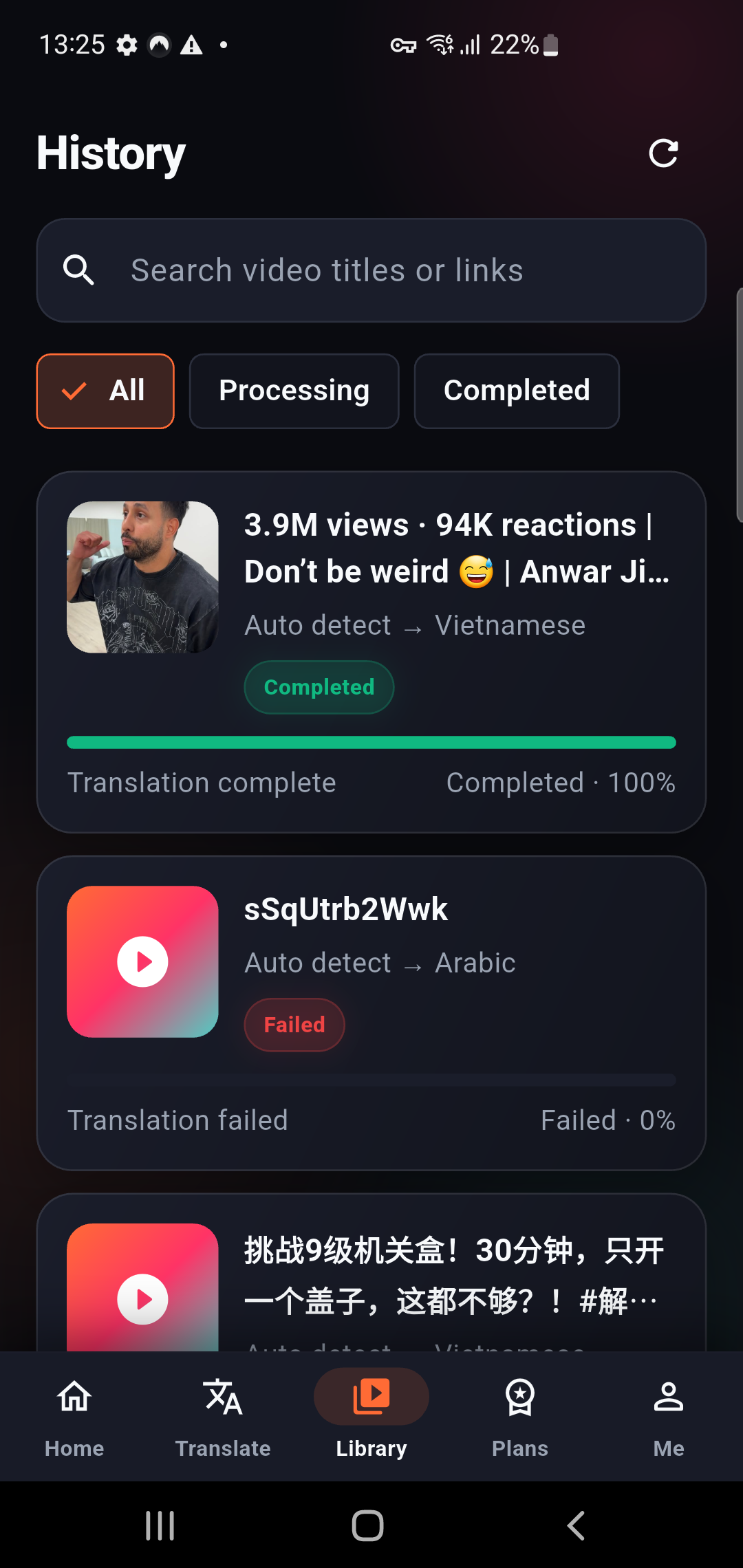
Library & History: Track job progress live and access past translations anytime.
- Progress indicators: View live completion percentages from transcription to translation and subtitle burning.
- Push & in-app notifications: As soon as your translated subtitles or dubbed video are ready, Subly sends an instant notification so you can jump right back in.
- Searchable history: Filter by processing status or search past videos by title or URL.
4. Built-in Video Player with Translated Subtitles
Check your results immediately within the app. Our built-in video player renders the translated video with burned-in subtitles, synchronized timecodes, and playback controls.
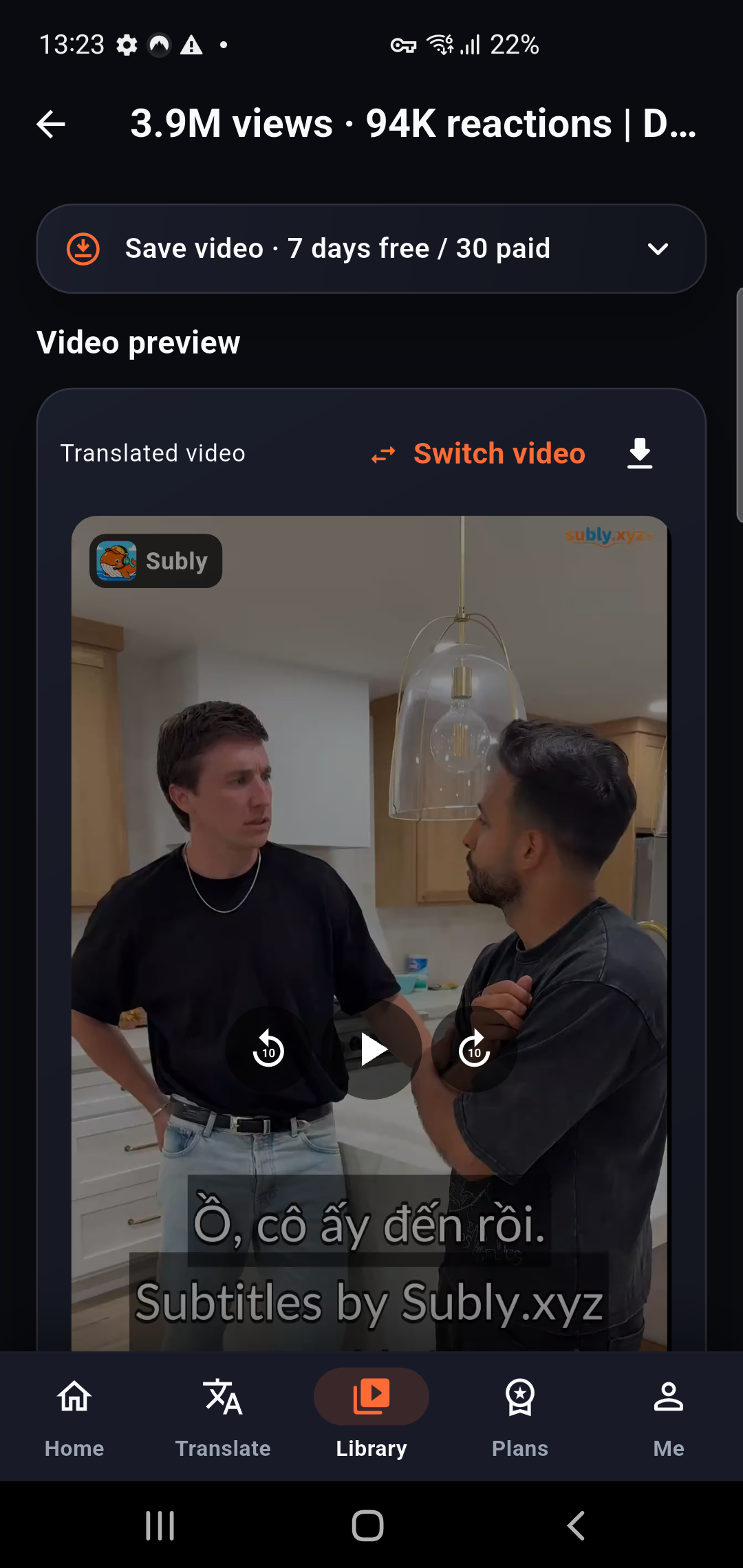
In-app video preview: Watch your translated video with burned-in subtitles immediately.
You can easily preview the video, inspect translation accuracy, and switch between original and translated versions before downloading or sharing.
5. Multi-Format Downloads: Videos, SRT, and VTT
Creators often need different formats for different platforms. Subly gives you full flexibility with multiple download and export choices:
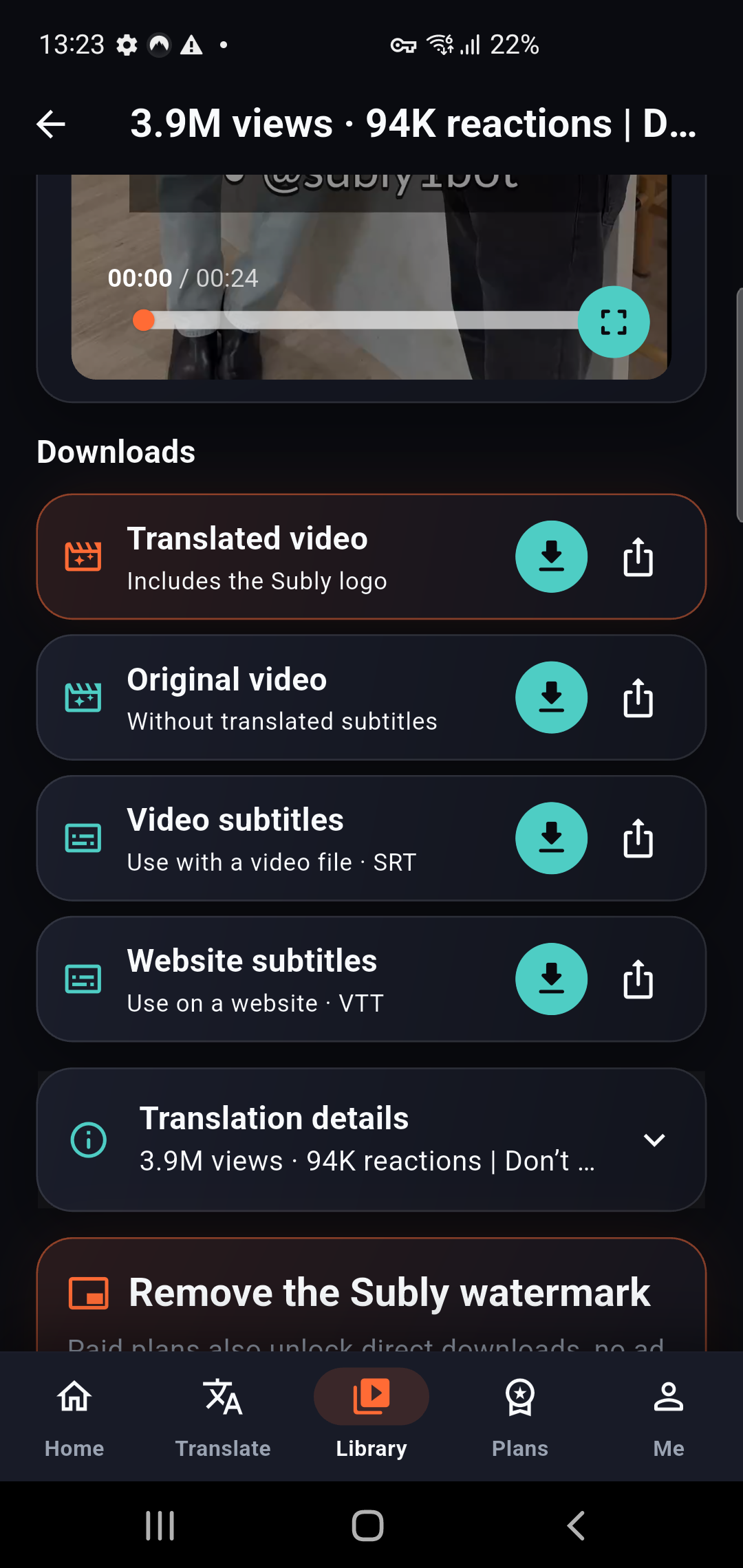
Flexible downloads: Save translated MP4, clean video, or standard SRT/VTT subtitle files.
- Translated Video (MP4): Ready-to-share video with beautifully formatted, burned-in subtitles.
- Original Video: Clean video file without subtitles for archiving or re-editing.
- Video Subtitles (.SRT): Standard subtitle file compatible with YouTube Studio, Premiere Pro, CapCut, and VLC.
- Website Subtitles (.VTT): Web-standard captions ready for online players and HTML5
<track>tags. - Native Android Share: Tap the share icon to post directly to WhatsApp, Telegram, TikTok, Instagram, or Google Drive.
Free Daily Translation for Everyone
We believe high-quality translation tools should be accessible to everyone: - Free Daily Quota: Enjoy up to 30 video minutes every single day for free. - Videos Up to 15 Minutes: Perfect for social clips, tutorials, presentations, and podcast highlights. - No Credit Card Required: Download the app and start translating immediately.
If you produce high-volume content or need watermark-free downloads and long-form video support (up to 60+ minutes), you can upgrade anytime via our flexible plans.
What's Next: Step-by-Step Translation Tutorials
This launch is just the beginning! Over the coming weeks, we will be publishing a comprehensive series of step-by-step tutorials to help you get the most out of Subly on Android:
- How to Translate TikTok and Reels into Any Language: A quick guide for creators looking to reach global followers.
- Adding Accurate Subtitles to Educational YouTube Lectures: How students and researchers can study foreign-language materials effectively.
- Translating Podcasts & Audio Recordings on Android: Converting spoken interviews into translated text and subtitled video clips.
- Extracting and Editing SRT Subtitles for Video Creators: How to use Subly with CapCut, DaVinci Resolve, and Premiere Pro on mobile and desktop.
Stay tuned to our blog for these upcoming guides!
Get the Subly Android App Today
Ready to transform how you watch, learn, and create video? Download the Subly Android app today and experience seamless AI video translation on the go.
- Google Play Store: Get Subly on Google Play
- Web App: app.subly.xyz
- Telegram Bot: @subly1bot
Tags:
Try Subly Free — Right Now
Up to 30 video minutes per day on the free plan. Open Telegram or try Subly on Android and the web.
✓ TikTok ✓ YouTube ✓ Instagram ✓ Uploaded files
Open @subly1bot →